User Guide
This guide covers running canticle as a long-running service: the Lidarr webhook server, path resolution, health endpoints, Docker and Unraid deployment, the optional filesystem watcher, shell completion, and the inspection commands. For one-shot fetching and the full flag list, see the CLI Reference. For every setting, see Configuration.
Lidarr webhook server
MUSIXMATCH_TOKEN=YOUR_TOKEN MXLRC_WEBHOOK_API_KEY=mxlrc_your_webhook_key canticle --serve --listen 127.0.0.1:3876
MUSIXMATCH_TOKEN=YOUR_TOKEN MXLRC_WEBHOOK_API_KEY=mxlrc_your_webhook_key canticle serve --listen 127.0.0.1:3876
The server listens on MXLRC_SERVER_ADDR when --listen is not provided. Configure one or more webhook keys with MXLRC_WEBHOOK_API_KEY, use canticle keys create, or put the server address and webhook keys in a config file and start with canticle serve --config path/to/config.toml.
Webhook events are enqueued at high priority. If a webhook arrives for an artist/title that previously failed and is waiting out a retry backoff, the high-priority enqueue resets its retry timer so it becomes eligible immediately, jumping the queue. Scan-enqueued duplicates keep their existing backoff, so bulk scan traffic stays rate-limit protected. The worker's circuit breaker still pauses dequeuing globally when the upstream API signals rate limiting.
Lidarr rename hook
A lyric sidecar is orphaned when Lidarr renames a track file but leaves the
.lrc / .txt next to it under the old name. You can clean those up after the
fact with canticle realign, but you can also
prevent them entirely: contrib/lidarr-rename-sidecars.sh is a Lidarr Custom
Script that moves each sidecar alongside its audio at rename time.
Install it in Lidarr under Settings -> Connect -> Add -> Custom Script, point
it at the script path, and enable the On Rename trigger (the script exits
cleanly for every other event). It reads Lidarr's Lidarr_TrackFile_PreviousPaths
and Lidarr_TrackFile_Paths environment variables, and for each renamed track
moves the matching .lrc and .txt from the old stem to the new one - only when
the source exists and the destination does not, so it never clobbers an existing
file. Lidarr and the script must share the same view of the filesystem (identical
mount paths). See contrib/README.md for details.
Path resolution (Docker/Unraid)
Configured library scans are the source of truth for filesystem paths. When a Lidarr webhook arrives, canticle resolves the target file in this order:
- Scanned inventory. The webhook artist/title is matched against persisted scan results (using the same normalization as the cache), and a match reuses the exact container-visible source path and output destination the scan recorded. This is why you should add and scan your libraries (
canticle library add ..., thencanticle scan) before relying on webhooks. - Direct payload path. If there is no inventory match but the webhook payload carries a
trackFilespath that, after cleaning, lies inside one of your configured library roots and exists inside thecanticlecontainer, that path is used directly. Payload paths outside every configured root are never used as a write target; they fall back to metadata. This confinement is a security guard: it stops a webhook from directing a lyric write to an arbitrary location. As a result, raw payload-path resolution requires at least one configured library; with no libraries configured, step 2 is disabled and resolution goes straight from inventory to metadata. - Metadata fallback. Otherwise the lyrics are written to the configured
output.dirusing the webhook metadata.
On Unraid, Lidarr and canticle often see the same media through different mount paths. Because resolution prefers the scanned inventory, you do not need to maintain host-to-container path mappings: a payload path that is not visible inside the container, or that falls outside your configured library roots, simply falls back to metadata rather than failing.
Two operational notes:
- The library roots used to confine payload paths (step 2) are snapshotted when
servestarts. A library added withcanticle library add ...whileserveis running is not recognized for raw-payload-path resolution untilserveis restarted. (The periodic scheduler and watcher still pick up new libraries without a restart; only the webhook payload-path confinement uses the startup snapshot.) - Inventory matching for tracks with non-ASCII artist/title metadata converges after one rescan following an upgrade. The key-backfill migration applies a best-effort ASCII fold to pre-existing rows; the exact normalized keys are written on the next library scan, so run
canticle scanonce after upgrading to make non-ASCII webhook matches reliable.
The library scan runs on a wall-clock schedule, set under [server.scan_schedule]:
[server.scan_schedule]
frequency = "daily"     # hourly | daily | weekly | off
at = "04:00"            # 24-hour local clock, required for daily and weekly
scan_on_start = false
daily and weekly both require at, and weekly additionally requires
day (a weekday name, e.g. day = "sunday"). hourly and off need
neither. An incomplete combination is rejected when you save it rather than
at the next restart, so the server cannot be left holding a config it will
refuse to start on.
This anchors the scan to the clock, so it survives restarts. The older scan_interval_seconds measured its interval from process start instead, which meant that on a host restarting the container regularly (a nightly backup, say) the timer was reset before it could fire and every restart cost a full library walk. scan_on_start defaults to off for the same reason: the filesystem watcher already catches changes, so a restart need not re-walk everything.
A missed window is skipped rather than run late - if the machine was down through 04:00, the scan waits for the next day. See Configuration for the full reference including daylight-saving behavior.
scan_interval_seconds is deprecated but still honored whenever scan_schedule.frequency is blank, so an existing config keeps working; set the schedule when convenient. The worker poll interval is unchanged: set work_interval_seconds under [server] or MXLRC_WORK_INTERVAL, with precedence CLI flag (--work-interval) > environment variable > config file > default (it falls back to api.cooldown, clamped to a 15-second floor).
Health and status endpoints
serve exposes lightweight endpoints for container orchestration:
GET /healthz(unauthenticated) returns200with{"status":"ok"}whenever the HTTP server is accepting requests. Use it for Docker/Unraid liveness probes.GET /readyz(unauthenticated) verifies database reachability and returns200when ready or503when the database is unavailable. Error detail is omitted so it never leaks paths or connection strings.GET /api/v1/status(requires anadmin-scoped API key) returns a queue summary grouped by status, for example{"status":"ok","queue":{"pending":3,"failed":1}}. It exposes no tokens, webhook keys, or filesystem paths.
Example Docker healthcheck: curl -fsS http://127.0.0.1:3876/readyz.
Metrics endpoint
GET /metrics returns a Prometheus text-exposition (version 0.0.4) response suitable for scraping by Prometheus, Grafana Agent, or any compatible collector. Metrics are computed from read-only database queries at scrape time; there is no in-process registry or caching.
Exposed metric families:
| Metric | Type | Description |
|---|---|---|
mxlrcgo_queue_items{status="..."} |
gauge | Work queue item count per status (pending, processing, done, failed, deferred). |
mxlrcgo_queue_failures{reason="..."} |
gauge | Failed queue items grouped by error reason. |
mxlrcgo_provider_hits_total{lane="..."} |
counter | Successful lyrics fetches per provider lane. |
mxlrcgo_provider_misses_total{lane="..."} |
counter | Benign no-result misses per provider lane. |
mxlrcgo_instrumental_tracks |
gauge | Queue items confirmed instrumental by audio detection. |
Lane-attribution caveat (from v1.7.0). On a deployment whose [providers].primary was set to something other than musixmatch, the two mxlrcgo_provider_*_total families credited the wrong lane. The worker named its primary lane from a hardcoded constant rather than from the provider it had actually been given, so every hit and miss the primary provider earned was tallied under the lane="musixmatch" label. The window opens at v1.7.0, the release that introduced these counters (a non-musixmatch primary had been selectable since v1.4.0, but no counter existed to be skewed before v1.7.0), and closes with the release carrying the fix (v1.35.1 is the last release known to be affected). Deployments that left primary at its musixmatch default are unaffected.
These are cumulative counters in an append-only aggregate keyed on the lane name, with no per-row identity, so the wrongly credited increments cannot be located and reversed. The counters are not repaired retroactively: a scrape spanning the window carries the skew forward permanently, and a rate over a window that straddles the fix will show the primary lane appearing from nothing while musixmatch flattens. For any per-lane question about that period, use the Provider effectiveness report instead, which reads the per-track lane_attempts table. Note the two instruments count different things (see that report's own caveat below), so treat it as the better attribution rather than as a corrected version of these counters.
Access control. The endpoint is gated by the trusted-network allowlist, not an API key or session cookie. Loopback (127.x.x.x, ::1) is always trusted. A remote scraper (Prometheus server, Grafana Agent, etc.) must have its host CIDR listed in [server.trusted_networks].cidrs. A spoofed X-Forwarded-For header cannot forge a trusted source.
To enable a remote scraper, add its CIDR to config.toml:
Or override with the environment variable: MXLRC_TRUSTED_CIDRS=192.168.1.0/24.
Example Prometheus scrape_configs entry:
Docker
The container runs the webhook service on port 50705 and stores its config and SQLite database under /config. Mount your media following the TRaSH Guides single-mount convention: map your data parent to /data and add your music root with canticle library add /data/media/music. In serve mode lyrics are written next to each audio file, so the container does not need an output directory: MXLRC_OUTPUT_DIR is ignored for normal serve output (it only sets the fallback location for the metadata-only webhook path, where no source file is known). Just mount your media and register the library; there is nothing else to point at an output folder.
Published GHCR tags:
latest- latest stablev*.*.*release<version>- exact release version, for example1.0.0<major>.<minor>- stable minor line, for example1.0beta- latest prerelease channel tag<version>-<pre>- exact prerelease version, for example1.1.0-beta.1or1.1.0-rc.1dev/nightly- latest scheduled build frommainnightly-YYYYMMDD- dated nightly build frommain
docker run -d \
  --name canticle \
  -p 50705:50705 \
  -e MUSIXMATCH_TOKEN=YOUR_TOKEN \
  -e MXLRC_WEBHOOK_API_KEY=mxlrc_your_webhook_key \
  -e PUID=99 \
  -e PGID=100 \
  -v canticle-config:/config \
  -v /path/to/your/data:/data:rw \
  --restart unless-stopped \
  ghcr.io/sydlexius/canticle:latest
For Compose, copy docker-compose.example.yml, set MUSIXMATCH_TOKEN and MXLRC_WEBHOOK_API_KEY, adjust the music volume, then run:
MXLRC_DOCKER=true makes default storage paths resolve to /config/config.toml and /config/mxlrcgo.db.
To inspect or maintain the queue and scan state inside the container, exec the same canticle queue and canticle scan results / canticle scan clear commands documented in the Inspection commands section below (for example docker exec canticle canticle queue failed).
Encrypted secrets
The two recoverable runtime secrets, the Musixmatch API token and the serve-mode webhook API key, can be stored encrypted at rest in the SQLite database (AES-256-GCM) instead of as plaintext in config.toml and environment variables. This is opt-in: existing env/TOML setups keep working unchanged, because the encrypted database store is the lowest-precedence source. CLI flags, environment variables, and TOML all still win over it.
What it protects (and what it does not)
At-rest encryption defends a narrow boundary. It protects against database-only exfiltration: a copied or backed-up .db file, an accidental git commit, or a stray copy of just the database cannot be read back into the plaintext token. It does NOT protect a compromised running process (the decrypted values are in memory at use time), and it does NOT protect whole-volume theft when the key file lives in the same mount as the database. For whole-volume-theft protection, use MXLRC_MASTER_KEY or a separately-mounted key file (see below).
Managing secrets
Three commands manage the encrypted store. None of them ever print a secret value.
# Encrypt the currently effective plaintext secret(s) into the database. Reads
# the normal CLI/env/TOML precedence but skips the database itself as a source,
# so it never copies the database onto itself. With no flag it imports both
# currently-set secrets; scope it with --token or --webhook.
canticle secrets import
canticle secrets import --token
canticle secrets import --webhook

# Set one secret by name from stdin. The value is read from the terminal prompt
# or a pipe, never from the command line (the command line lands in shell
# history and ps). Valid names: musixmatch_token, webhook_api_key.
canticle secrets set musixmatch_token        # prompts for the value
printf '%s' "$TOKEN" | canticle secrets set musixmatch_token   # or pipe it

# List stored secret names and their last-updated timestamps. Never prints values.
canticle secrets list
secrets import is idempotent: re-running overwrites the existing encrypted row. After a successful import, the command reminds you to remove the now-redundant plaintext from config.toml and your compose environment so it is no longer stored in the clear.
Key management
The 32-byte encryption key is resolved from one of two sources, in order:
MXLRC_MASTER_KEY(base64 of 32 random bytes). When set, it takes precedence and no key file is read or written. Use this to keep the key entirely off the data volume (recommended hardening when your threat model includes whole-volume theft). Generate one withopenssl rand -base64 32.- A key file (32 raw bytes, auto-generated with
0600permissions on first use). The default location is a hidden.mxlrcgo.keybeside the database. This is the universal zero-setup default on all platforms, including Docker. Override the location with thesecrets.key_fileTOML key or theMXLRC_SECRETS_KEY_FILEenvironment variable to place the key file on a separate, narrower mount.
A malformed MXLRC_MASTER_KEY or an unreadable key file is a loud, fatal startup error. The daemon never silently falls back to running unencrypted.
Docker key setup
In Docker mode (storage paths resolve under /config), the daemon auto-creates a 0600 key file at /config/.mxlrcgo.key on first use - the same zero-setup behavior as native installs. No extra step is required to start.
Important caveat: /config/.mxlrcgo.key lives in the same bind-mount as the database. An attacker who copies the entire /config volume gets both the key and the ciphertext, so the at-rest encryption only protects against database-only exfiltration (backups, stray copies), not whole-volume theft. If that is in your threat model, set MXLRC_MASTER_KEY to keep the key off the data volume entirely:
# docker-compose.yml - optional hardening: key separated from the data volume
services:
  canticle:
    image: ghcr.io/sydlexius/canticle:latest
    environment:
      # Optional. Generate once: openssl rand -base64 32
      # Source from a .env file NOT inside the /config volume.
      MXLRC_MASTER_KEY: ${MXLRC_MASTER_KEY}
    volumes:
      - ./config:/config
Alternatively, point MXLRC_SECRETS_KEY_FILE at a separately-mounted file to get key/data separation without an environment variable:
Precedence
The encrypted database store is the lowest-precedence source for both secrets:
- Musixmatch token:
--tokenCLI flag, thenMUSIXMATCH_TOKEN, thenMXLRC_API_TOKEN, then TOMLapi.token, then the encrypted database store. - Webhook key: the CLI/env flag, then TOML
server.webhook_api_keys, then the encrypted database store.
A higher-precedence source is used as-is at runtime and is never auto-persisted to the database. Persistence happens only when you run secrets import or secrets set.
Key-loss recovery
Losing the key - a deleted .mxlrcgo.key file or a lost MXLRC_MASTER_KEY value - makes the encrypted secrets unrecoverable by design: there is no backdoor and no recovery key. The remedy is to re-enter the secrets with their original plaintext, by re-running secrets import (from a config or environment that still has the plaintext) or secrets set. Back up your key file or MXLRC_MASTER_KEY value in a safe location outside the data volume.
Unraid
Canticle is available in Unraid Community Applications. The template is maintained in the sydlexius/unraid-templates repository, which is the repository Community Applications indexes; it is not kept in this repository. The template provides a GHCR image, bridge networking, /config appdata, a music library mapping, and advanced PUID/PGID permission and tuning fields (scan/work intervals and the filesystem watcher).
Library mounts. Prefer mapping the parent of your media into the container once and adding library roots beneath it, rather than a separate mount per library. This keeps container-visible paths stable and matches the single-mount convention used by the TRaSH Guides Unraid layout, which maps /mnt/user/data to /data with media under /data/media:
| Host path | Container path |
|---|---|
/mnt/user/data |
/data |
Then register the library (or libraries) under it (paths are container-visible):
docker exec canticle canticle library add /data/media/music --name Music
docker exec canticle canticle scan
(Unlike the *arr apps, Canticle never moves or hardlinks files; it only reads audio and writes a .lrc/.txt sibling. The single-mount convention is still worth following so paths match the rest of your stack.)
If your music instead lives in several separate top-level shares, map their common parent once, or add one Path mapping per share beneath /data/media (for example /mnt/user/<share> to /data/media/<share>) and register each with library add. Lyrics are written next to each audio file, so libraries do not need a shared output root; set MXLRC_OUTPUT_DIR only for the webhook metadata-fallback case (step 3 under Path resolution).
Web UI enablement
The browser UI is off by default. The serve listener only mounts the web routes when the UI is explicitly enabled, so a fresh Docker or Unraid deployment serves the webhook API alone until you turn it on.
Enable it (headless). Set MXLRC_WEB_UI_ENABLED=true in the container environment (the Unraid template ships this variable, and docker-compose.example.yml sets it). The equivalent config-file setting is web_ui_enabled = true under [server] in config.toml; the env var overrides the file when both are present. With the UI off, neither the pages nor the /login or /setup routes exist.
Bootstrap the first admin (headless). The setup page (/setup) is reachable to any client that can reach the port until the first admin exists, so a remote Unraid box can complete first-run setup through the browser without granting a trusted-network bypass. Env-bootstrap remains the better choice on an exposed network: it creates the admin before the listener ever serves /setup, closing the window entirely rather than leaving it open until someone visits the page.
Secret hygiene. Never hardcode the bootstrap password in a compose file or source control. Supply it from an uncommitted .env file or a secret manager using ${MXLRC_WEBAUTH_ADMIN_PASSWORD} interpolation, as shown in docker-compose.example.yml. The binary reads MXLRC_WEBAUTH_ADMIN_PASSWORD from the environment variable only - it does not read Docker or Swarm secret files (/run/secrets/...) directly. If you store the password as a Docker Secret, export it into the variable in your container entrypoint before the service starts: export MXLRC_WEBAUTH_ADMIN_PASSWORD="$(cat /run/secrets/webauth_admin_password)".
Bootstrap behavior:
- The web UI must be enabled. The bootstrap only runs when
web_ui_enabled = trueunder[server](orMXLRC_WEB_UI_ENABLED=true). With the UI off the variables are ignored and no admin is created; since v1.20.1 that is logged at warning level naming the setting to change. - Both vars required. Setting only one logs a warning and skips the bootstrap.
- Password floor. The password must be at least 8 characters. A shorter one is a fatal startup error (the container will not start), not a silent skip.
- Idempotent. The bootstrap runs only when no admin exists yet. Once any admin account is present it is skipped (never an overwrite), so leaving the vars set across restarts is harmless. The password is never logged.
- It is a bootstrap, not a rotation control. Changing
MXLRC_WEBAUTH_ADMIN_PASSWORDafter an admin exists and restarting does not change the password. The bootstrap is skipped, the service starts healthy, and the previous password stays active. Since v1.20.1 that skip is logged at warning level and names the command below; older builds logged it at info level, where it read as reassurance. To change an existing password, use Changing or resetting the admin password.
First login and cleanup. After the container is up, browse to http://[host]:[port]/login and sign in with the bootstrapped credentials. Then rotate the password with canticle admin set-password (see below) and remove the MXLRC_WEBAUTH_ADMIN_USER / MXLRC_WEBAUTH_ADMIN_PASSWORD env vars. Because the bootstrap is idempotent, the stale vars do nothing on the next start, but removing them keeps the plaintext password out of the container environment.
Changing or resetting the admin password
Use canticle admin set-password. This is the only supported way to change an existing admin password: there is no password-change screen in the web UI yet (tracked in issue #545), and editing the bootstrap environment variable does nothing once an admin exists.
In Docker or Unraid, run it inside the running container, piping the password in from the host so it never appears in the docker exec arguments:
Do not embed the password in the command itself (for example inside sh -c '... printf "your-password" ...'). Anything on the command line is visible in the host's process list to every other user on the machine, and lands in your shell history, which are exactly the channels reading from stdin avoids.
Notes on how it behaves:
- The password is read from standard input, never a flag. A
--passwordflag would place the credential in your shell history and in the host's process list, where any other user on the machine can read it. Read it from a file or a secret manager. Typing it inline (printf '%s' 'pw' | ...) keeps it off the process list but still records it in shell history, so treat that as a last resort and clear the entry afterwards. This mirrorscanticle secrets set, which rejects a value passed on the command line for the same reason. - A trailing newline is stripped, so the usual
echoand heredoc forms behave as expected. Leading and trailing spaces are preserved, because they may be part of the passphrase. - Existing sessions are revoked. Anyone signed in with the old password is signed out immediately. That is the point of rotating a compromised credential, and it means you will need to sign in again yourself.
- The change is atomic. The password update and the session revocation happen in one database transaction, so a rotation either fully applies or leaves the account untouched. It cannot half-apply.
- No restart is needed. The change takes effect immediately.
- The password is never printed, and the minimum length is 8 characters.
If you are locked out entirely (password lost, and no session), the same command works because it acts directly on the database rather than requiring a login. Run it on the host or inside the container as shown above. You do not need to delete anything from the database, and you should not: on releases before v1.20.1 the only route was removing the admin row by hand, which is no longer necessary and is easy to get wrong.
If your build predates v1.20.1, canticle admin set-password is either absent or unreachable (in v1.20.0 the subcommand shipped but could not be invoked, falling through to the legacy argument parser with unknown argument --user). Upgrade to v1.20.1 or later, then use the command above.
If the UI is reachable beyond your local machine, also read Security considerations below: put it behind TLS so the session cookie is not sent in cleartext.
Web UI: Dashboard
The Dashboard (/dashboard) is the default landing page after you sign in - the bare root (/) redirects to it. It is a read-only, never-cached observability view that runs live database queries at request time. It shows:
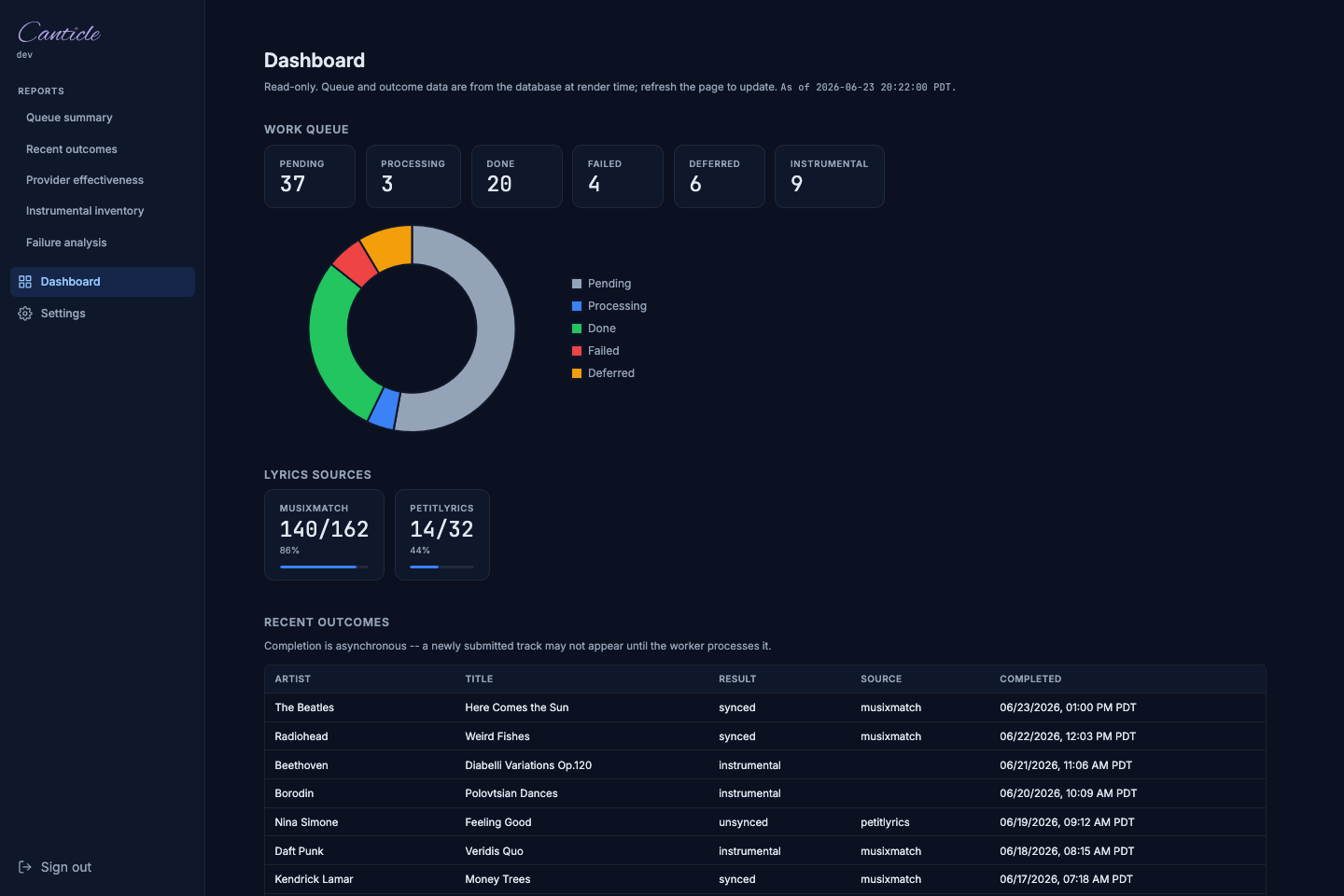
- Work queue tiles and chart. Counts of work queue items by status (pending, processing, done, failed, deferred), with a doughnut chart of the same segments.
- Per-provider effectiveness tiles. One tile per provider lane showing
hits/attemptsand an inline hit-rate bar (the percent ishits / (hits + misses), where a hit means the lane served the winning result). - Instrumental count. The number of tracks marked instrumental.
- Recent outcomes. The 20 most recently completed tracks (artist, title, album, result class, the provider lane that served it, and the completion time in the server's timezone when
TZis set, otherwise UTC).
The Dashboard requires the web UI to be enabled and an admin session (or a trusted-network request), the same as the other UI pages. For the deeper per-report views (queue summary, recent outcomes, provider effectiveness, instrumental inventory, failure analysis), see the Reports workspace below.
Web UI: Settings page
The Settings page (/settings) is the single destination for editing the daemon configuration from the browser. It is available whenever web_ui_enabled = true and the operator is signed in as admin (or is accessing from a trusted network).
Prerequisite. The page is only reachable when the web UI is enabled (web_ui_enabled = true under [server] or MXLRC_WEB_UI_ENABLED=true). See Web UI enablement for the bootstrap steps.
Tab layout
The page has three CSS-only tabs (no JavaScript round-trip to switch):
- Common - everyday fields: API token, webhook key, listen address, web UI toggle, and similar high-touch settings. This is the default tab.
- Advanced - every other field, organized by config section (API, output, providers, verification, instrumental detector, enrichment, guard, queue, logging, and so on).
- Raw config - a read-only view of the effective configuration as TOML, with secrets redacted. Use this to verify exactly what the daemon is running before a restart.
Risk-tiered saves
Fields are classified into three risk tiers that control how a save is triggered:
- safe - auto-saves on change; no button click required.
- caution - requires an explicit Save button click.
- critical - requires Save plus a browser confirmation dialog before the value is written.
Changes are written to the config file and take effect on the next restart, not live. A status line below each field reports the result of the save POST.
Locked fields
A field whose value is set by an environment variable or a command-line flag shows a "Locked" pill and cannot be edited in the UI. The override source is described below the field. To regain control from the UI, clear the environment variable (or remove the flag) and restart the daemon.
CSRF
Write operations use a double-submit cookie token (mx-csrf-token). This is transparent during normal browser use but means direct curl POSTs without the matching cookie are rejected. The page must be loaded from the same origin before any write can succeed.
Recommended workflow
- Open the Common tab for routine changes (rotating the API token, updating the webhook key, changing the listen address).
- Use the Advanced tab for tuning (backoff windows, provider mode, verification thresholds, etc.).
- After saving, open the Raw config tab to verify the effective state before restarting the daemon.
- Restart the daemon to apply changes.
Webhook API keys
Lidarr (and any other webhook caller) authenticates to the serve listener with a webhook API key. Keys can be managed two ways: from the web UI or from the canticle keys CLI. Both write to the same key store in the database, so a key created on the CLI works for the UI list and vice versa.
A key's raw value is shown exactly once at creation and is unrecoverable afterward (only a hash is stored). Copy it then; if you lose it, revoke it and create a new one. Keys carry one or more scopes: webhook (accept Lidarr webhook calls - the common case) and admin (full access, including the status and metrics endpoints).
From the web UI
The key management page lives at /settings/keys (reachable when the web UI is enabled and you are signed in as admin or on a trusted network). It shows a masked list of existing keys - truncated public ID, name, scopes, and the created/revoked timestamps in your local timezone - and a create form. The page never renders raw key material or a full hash.
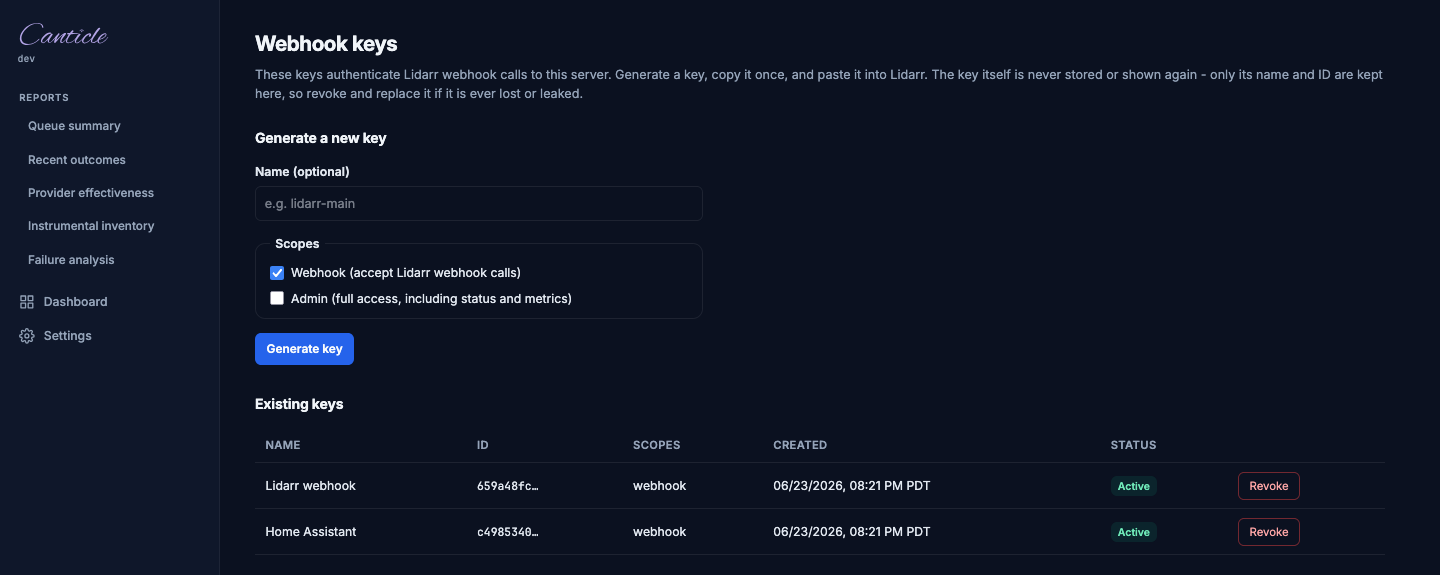
- Create. Enter a name, choose the scopes (webhook is pre-checked), and submit. The new raw key is revealed once in the result panel.
- Revoke. Revocation is by public ID (the raw key is unrecoverable). A revoked key is shown struck through with its revocation time; it no longer authenticates.
Create and revoke are CSRF-protected (a same-origin form submission with the double-submit token), so direct curl POSTs without the page-issued cookie are rejected.
From the CLI
# Create a key (prints the raw key once on stdout - save it).
canticle keys create --name lidarr --scope webhook
canticle keys create --name admin-tool --scope admin   # repeat --scope to grant several

# List keys: tab-separated public ID, name, scopes, and revoked-at (empty if active).
canticle keys list

# Revoke a key by passing its raw value.
canticle keys revoke <raw-api-key>
keys create prints only the raw key on stdout, so you can capture it directly (for example KEY=$(canticle keys create --name lidarr)). With no --scope flag the key defaults to the webhook scope. All three subcommands accept --config to point at a non-default config file. Under Docker, run them via docker exec, for example docker exec canticle canticle keys list.
The CLI and the MXLRC_WEBHOOK_API_KEY environment variable are independent ways to supply webhook keys: env/TOML keys (server.webhook_api_keys) are static configuration, while keys create mints managed keys in the database that can be listed and revoked individually.
Windows
Download the signed .zip archive for windows/amd64 from the GitHub releases page. Extract canticle.exe to one of:
%LOCALAPPDATA%\mxlrcgo-svc\- user-mode install; no administrator rights required.C:\Program Files\mxlrcgo-svc\- system-wide install; requires administrator rights.
Add the chosen directory to your PATH so canticle is reachable from any shell.
Manual run. To start the server from a terminal (useful for initial testing):
set MUSIXMATCH_TOKEN=YOUR_TOKEN
set MXLRC_WEBHOOK_API_KEY=mxlrc_your_webhook_key
canticle serve --listen 127.0.0.1:3876
Or use a config file to keep credentials out of the shell environment:
NSSM service installation
NSSM (the Non-Sucking Service Manager) wraps any executable as a Windows service with automatic restart, reliable start/stop, and log capture. Download a release build from nssm.cc and place nssm.exe somewhere on your PATH.
Install the service. Run the following from an elevated (Administrator) Command Prompt:
NSSM opens a GUI. Fill in the tabs:
- Application tab:
- Path: full path to
canticle.exe, for exampleC:\Program Files\mxlrcgo-svc\canticle.exe - Arguments:
serve --listen 0.0.0.0:3876(orserve --config C:\path\to\config.tomlif you use a config file) -
Startup directory: the directory containing
canticle.exe -
Environment tab. Add one variable per line:
MUSIXMATCH_TOKEN=YOUR_TOKEN
MXLRC_WEBHOOK_API_KEY=mxlrc_your_webhook_key
MXLRC_DB_PATH=C:\ProgramData\mxlrcgo-svc\mxlrcgo.db
Set MXLRC_DB_PATH explicitly so the database lives in a known, writable location rather than depending on the service account's XDG defaults (see Data location below).
- I/O tab. Set Stdout and Stderr to a log file, for example
C:\ProgramData\mxlrcgo-svc\logs\mxlrcgo-svc.log. NSSM rotates these automatically.
Click Install service, then start it:
Manage the service:
nssm start mxlrcgo-svc
nssm stop mxlrcgo-svc
nssm restart mxlrcgo-svc
nssm status mxlrcgo-svc
nssm remove mxlrcgo-svc confirm   # uninstall
To update the configuration after installation, run nssm edit mxlrcgo-svc from an elevated prompt.
Data location
Without an explicit MXLRC_DB_PATH, canticle resolves storage paths via XDG base directories. On Windows these defaults resolve to:
| Item | Default path |
|---|---|
| Config file | C:\Users\<user>\.config\mxlrcgo-svc\config.toml |
| Database | C:\Users\<user>\.local\share\mxlrcgo-svc\mxlrcgo.db |
A service account resolves these under its own profile, which may not be immediately obvious. Set MXLRC_DB_PATH (and --config) explicitly in the NSSM environment tab to put data in a known, persistent location (for example C:\ProgramData\mxlrcgo-svc\).
Removing or uninstalling the NSSM service does not delete the database or config file. Remove them manually for a clean uninstall.
SmartScreen note
Even signed binaries can trigger the "Windows protected your PC" prompt on first launch when the executable's download reputation is too low. If you see this:
- Click More info.
- Click Run anyway.
This prompt should not appear again after the first run. See issue #183 for background on code signing.
Native packages
The .deb, .rpm, and .apk packages install the binary, a service unit, and an example config. They do not enable or start the service on install; you must do that manually after setting your token.
System user and state directory
The post-install script creates a mxlrcgo-svc system user and group (no login shell, no home-directory creation), then initializes /var/lib/mxlrcgo-svc (mode 0750, owned by mxlrcgo-svc:mxlrcgo-svc). The service unit sets MXLRC_DB_PATH=/var/lib/mxlrcgo-svc/mxlrcgo.db and MXLRC_LOG_FORMAT=json in its environment.
Hardening
The systemd unit runs with ProtectSystem=strict, ProtectHome=true, PrivateTmp=true, and NoNewPrivileges=true. Only /var/lib/mxlrcgo-svc is writable. The OpenRC service on Alpine enforces the same ownership via start_pre.
Config file
Copy the example and set your token before starting the service:
sudo cp /etc/mxlrcgo-svc/config.example.toml /etc/mxlrcgo-svc/config.toml
sudo editor /etc/mxlrcgo-svc/config.toml
The service reads /etc/mxlrcgo-svc/config.toml automatically when MXLRC_DB_PATH is the native-package default. Pass --config /etc/mxlrcgo-svc/config.toml explicitly if you override the database path.
Service management
systemd (Debian / Ubuntu / RHEL / Fedora / Rocky):
sudo systemctl enable mxlrcgo-svc   # start on boot
sudo systemctl start mxlrcgo-svc
sudo systemctl stop mxlrcgo-svc
sudo systemctl restart mxlrcgo-svc
sudo systemctl status mxlrcgo-svc
sudo journalctl -u mxlrcgo-svc -f   # follow logs
OpenRC (Alpine):
sudo rc-update add mxlrcgo-svc default   # start on boot
sudo rc-service mxlrcgo-svc start
sudo rc-service mxlrcgo-svc stop
sudo rc-service mxlrcgo-svc restart
sudo rc-service mxlrcgo-svc status
Data preservation on removal
Package removal stops the service but intentionally preserves /var/lib/mxlrcgo-svc (the SQLite database and any config) and the mxlrcgo-svc system user. This means reinstalling or upgrading the package keeps your cache and settings. Remove the directory manually for a clean uninstall:
Recording enrichment
Recording enrichment reads the ISRC, MusicBrainz recording ID, and duration from each file's audio tags and passes them to the matcher to disambiguate results (for example, telling two same-titled recordings apart). It is on by default.
You can control it at three levels, resolved with the precedence CLI flag > per-library setting > global default:
- Global default (
config.toml):[enrichment] enabled = true(envMXLRC_ENRICHMENT_ENABLED). Defaulttrue. Setfalseto skip enrichment everywhere unless a library or run opts back in. - Per library:
canticle library add/update --enrich(force on) or--enrich=false(force off). Omit the flag to inherit the global default. - Per run:
canticle scan --enrichor--no-enrichoverrides both for that single scan (the two flags are mutually exclusive). The serve-mode scheduler has no per-run flag; it resolves per library against the global default.
When enrichment is off for a track, the scanner skips ISRC, MBID, and duration extraction as a unit, and the track keeps the duration_bucket = 0 cache fallback (no behavior regression). A per-library or global change only affects scans run after the change; it does not restamp already-scanned rows.
Instrumental detection
The optional instrumental-detection sidecar samples each track's audio with ffmpeg and asks an external classifier whether it is instrumental, writing an instrumental marker on a provider miss. It runs only when a classifier URL is configured ([instrumental_detector] classifier_url). Because it costs an ffmpeg sample plus an inference call per track, you may want it on a small curated or soundtrack-heavy library but off on a large bulk one.
For how the detector decides (the two-gate model), the YAMNet sidecar setup and {mean,max} contract, deploy ordering, and threshold tuning, see the dedicated Instrumental Detection reference. This section covers only the enable/override controls.
You control it at three levels, resolved with the precedence CLI flag > per-library setting > global default:
- Global default (
config.toml):[instrumental_detector] enabled(envMXLRC_INSTRUMENTAL_DETECTOR_ENABLED). Defaultfalse. - Per library:
canticle library add/update --detect-instrumental(force on) or--detect-instrumental=false(force off). Omit the flag to inherit the global default. - Per run:
canticle scan --detect-instrumentalor--no-detect-instrumentaloverrides both for the tracks enqueued by that scan (the two flags are mutually exclusive). serve has no per-run flag; it resolves per library against the global default.
The decision is resolved and stamped onto each work-queue item when it is enqueued (like the provider-set version), so a per-library or global change only affects tracks enqueued after the change. Tracks queued before per-library detection existed carry no decision and fall back to the global default at processing time. If an item requests detection but no classifier_url is configured, the worker logs an error and proceeds without detection (it never silently skips).
Filesystem watcher (optional, low-latency scans)
By default, serve only scans on the scheduler's tick (--scan-interval, default 900s), so a new track dropped into the library waits up to that interval before lyrics are fetched. An optional filesystem watcher reacts within seconds for the common single-host case. It is disabled by default and configured entirely through environment variables:
| Variable | Default | Purpose |
|---|---|---|
MXLRCGO_WATCH_ENABLED |
false |
Master switch. When unset/false, behavior is exactly as before. |
MXLRCGO_WATCH_DEBOUNCE_MS |
2000 |
Quiet period after the last event before a directory is scanned. Coalesces the event storms that taggers (Beets, Picard) produce when rewriting an album. |
MXLRCGO_WATCH_MAX_DIRS |
100000 |
Safety cap. Startup fails loudly if the configured roots contain more directories than this, rather than silently exceeding the kernel watch budget. |
When a file appears or changes, the watcher scans the affected directory (and its subtree, up to the configured scan depth) under the owning library and enqueues any cache misses at scan priority.
The watcher is best-effort and in addition to the periodic scan, never a replacement:
- Bind-mounted volumes, NFS, SMB, and Docker Desktop on macOS frequently drop or never emit filesystem events.
- Events that fire while the container is down are lost; there is no replay. The periodic scan reconciles them.
- On Linux, very large libraries may require raising the inotify watch limit, e.g.
sysctl fs.inotify.max_user_watches=524288.
Watcher-primary mode
Because the periodic scheduler remains the source of truth, you can run the watcher as the primary trigger and demote the periodic scan to a long reconcile backstop. Enable the watcher and raise the interval, e.g.:
The startup scan always runs regardless of the interval, so initial reconciliation is guaranteed. Do not set the interval to 0 (scan-once) unless you have verified the watcher actually delivers events on your filesystem, because then nothing reconciles missed events.
Verifying watcher events
The watcher emits INFO "watcher started" at boot (with library and directory counts). To confirm it is actually receiving events, enable debug logging (MXLRC_LOG_LEVEL=debug) and touch a file under a library root, then watch for DEBUG "watcher: event received" and a follow-up scan. If nothing appears, your filesystem is not delivering inotify events to the container and you must keep the periodic scan as the source of truth. Common offenders: Unraid /mnt/user (FUSE/shfs) bind mounts, NFS without NFSv4.1 delegations, SMB/CIFS, and Docker Desktop's virtualized mounts.
Shell completion
canticle completion <bash|zsh|fish> prints a sourceable completion script that completes subcommands, flags, and configured library names (the last queried live from the database, degrading gracefully when it is absent):
source <(canticle completion bash)                 # bash (e.g. in ~/.bashrc)
source <(canticle completion zsh)                  # zsh  (e.g. in ~/.zshrc)
canticle completion fish > ~/.config/fish/completions/canticle.fish
The scripts call a hidden __complete handler; library-name completion never creates the database.
Security considerations
Web UI and admin bootstrap. The browser UI is off by default; enabling it and bootstrapping the first admin on a headless Docker/Unraid host is covered in Web UI enablement under the Unraid section. The short version: enable with MXLRC_WEB_UI_ENABLED=true, bootstrap with MXLRC_WEBAUTH_ADMIN_USER / MXLRC_WEBAUTH_ADMIN_PASSWORD (8-char minimum, idempotent), then rotate the password and remove those env vars after first login. The interactive /setup page also works headlessly now (it is open until the first admin exists), but env-bootstrap closes that window before the listener ever serves the page, so it remains the safer headless path.
Session cookie and TLS. The browser session cookie (mxlrc_session) has its Secure flag set automatically when the connection is TLS - either a direct TLS listener or a trusted reverse proxy that sets X-Forwarded-Proto: https. On a plain-HTTP deployment the Secure flag is off and the cookie is sent in cleartext, which exposes it to network interception. If the web UI is reachable from outside your local machine, run it behind a TLS-terminating reverse proxy (nginx, Caddy, Traefik) or enable the built-in TLS listener ([server.tls] in config.toml). See README.md for TLS configuration options.
Inspection commands
The queue and scan subcommands expose the durable work queue and persisted
scan results so you can debug what the service is doing without opening the
SQLite database by hand.
# List the next 50 work_queue rows.
canticle queue list

# Filter by status; failed and deferred are also exposed as convenience subcommands.
canticle queue list --status pending --limit 100
canticle queue failed

# List deferred rows: benign misses (a track Musixmatch has no lyrics for yet)
# waiting out a fixed cooldown before re-check. These are NOT failures and are
# kept out of `queue failed`.
canticle queue deferred

# Reset a single failed row back to pending. Refused if the row is not failed
# (a deferred row is refused; let it re-check on its own, or re-trigger via webhook).
canticle queue retry 42

# Delete completed rows. Without --yes, prints what would be deleted.
canticle queue clear --done
canticle queue clear --done --yes

# List persisted scan_results, optionally filtered by library (name or id) and status.
canticle scan results
canticle scan results --library Music --status pending
canticle scan results --library 1 --limit 200

# Delete every scan_results row for a single library. Without --yes, prints what would be deleted.
# The library row itself is left intact.
canticle scan clear --library Music
canticle scan clear --library Music --yes
Realign orphaned sidecars
When an audio file is renamed but its .lrc / .txt lyric sidecar is not, the
sidecar is orphaned: it no longer shares a stem with any audio file, and a later
scan re-fetches lyrics that already exist on disk. canticle realign re-attaches
those orphaned sidecars to their audio, changing only the stem and never the
extension (a synced .lrc stays .lrc; an instrumental .txt marker stays
.txt and is never promoted).
Each orphan is classified into one of these confidence tiers, and only clean matches are ever renamed:
- exact - the orphan's
[isrc:]/[mbid:]header uniquely matches one audio file's embedded ISRC/MBID (matched inidentity_keysorder, defaultmbidthenisrc). - heuristic - exactly one orphaned sidecar and exactly one sidecar-less audio
file in the same directory, whose names match closely enough (a Jaro-Winkler
name guard at
min_confidence) and distinguishably enough: the pair must also beat the orphan's best score against every other audio file in that directory - including ones that already have a sidecar - bymin_margin. Only the title is compared, never the artist; inside an album directory every track shares the artist, so including it would let two unrelated songs score as a match. If neither the sidecar header nor the audio tags yield an artist/title, the name check is skipped and the lone pair is matched positionally. - heuristic-nm - opt-in (
name_match = true), for a directory with multiple orphaned sidecars and multiple sidecar-less audio files (a folder of renamed tracks) - the shape the single-candidate heuristic tier above cannot resolve. Every orphan is scored against every remaining candidate; a pairing is accepted only when it clearsmin_confidenceand the orphan's best score beats its runner-up by at leastmin_margin. Off by default, so such a directory stays ambiguous until you opt in. - ambiguous - zero or multiple candidates on either side, or a pairing too
close to call. Both name tiers can report a near-tie:
heuristicwhen the pair fails to beat the orphan's best rival in the directory bymin_margin,heuristic-nmwhen the best score fails to beat its runner-up by the same. Reported and skipped, never guessed. - conflict - contradictory signals (multiple exact matches) or a destination sidecar that already exists. Reported and skipped, never clobbered.
# Preview what would change across all libraries (dry run, the default).
canticle realign

# Apply the moves; every rename is recorded in a JSONL backup first.
canticle realign --yes

# Limit to a single library, and choose the backup path.
canticle realign --library Music --yes
canticle realign --yes --backup /data/realign-undo.jsonl
The applied-move backup (<db-dir>/realign-backup-<timestamp>.jsonl, or the
--backup path) records {"old_path","new_path","library_id","method"} per
line; swap old_path/new_path to undo. The behavior is tuned by the
[realign] config section - notably
require_provenance (restrict applied moves to the exact tier), cross_directory
(let an exact match move a sidecar between directories), min_confidence
(the heuristic name-guard floor), name_match (enable the N:M matcher), and
min_margin (the ambiguity-rejection threshold, applied to both
name-similarity tiers).
The exact tier requires ISRC/MBID-tagged audio; libraries whose files carry no
such tags fall back to the heuristic tier (or, with name_match enabled, the
N:M matcher for directories the single-candidate heuristic can't resolve). To
prevent orphaning at the source, Lidarr users can install the
rename hook below.
Reports workspace
The web UI exposes five read-only report views under the Reports section. Every report runs a live database query at request time; there is no pre-aggregation or caching. The reports require the web UI to be enabled (web_ui_enabled = true).
Queue summary
Shows the count of work queue items grouped by status: pending, processing, done, failed, deferred, and total. Use this as a quick health check - a rising failed count warrants a look at the Failure analysis report; a large deferred count is normal (those are benign misses awaiting their next retry).
Recent outcomes
Lists the most recently completed tracks, newest first, with:
- Artist, title, and album.
- Completion timestamp.
- Provider lane that served the result.
- Result class: synced (an .lrc was written), unsynced-or-instrumental (a .txt was written - covers both plain unsynced lyrics and instrumental markers), or miss (the track exhausted its miss budget with no lyrics found).
Note: .txt results group plain unsynced lyrics and audio-detected instrumentals together. Use the Instrumental inventory report to isolate audio-detected instrumentals.
Provider effectiveness
Shows per-lane hit/miss counts and a true per-track hit-rate for each provider lane. The hit-rate is computed as hits / (hits + misses) where a "hit" means the lane served the winning result and a "miss" means the lane was tried but did not win (including being outcompeted by a later lane in ordered mode).
No-backfill caveat. This report reads the lane_attempts table, which was added in a later migration. Traffic that predates the migration has no lane-level records, so the report shows an empty state until new attempts accrue after the migration. This is expected; no historical backfill is possible.
Lane-attribution caveat (from v1.7.0). On a deployment whose [providers].primary was not musixmatch, rows this table recorded during that window name the wrong lane, from the same defect described under the metrics endpoint: the primary lane's name came from a hardcoded constant, so the primary provider's work was recorded against musixmatch. Unlike the /metrics counters, these rows do carry per-track identity and are therefore correctable in principle, but no correction has been applied.
How far you can read through the misnaming depends on the configuration. Where the primary was the only lane, or where the fallbacks were all other providers, it is a uniform relabel: the per-track hit and miss structure is intact and only the name on it is wrong, so a reader who knows which provider was primary can read through it, and this report stays the better instrument for the period. Where musixmatch was also configured in fallback_order behind a different primary, it is not: the primary lane's hardcoded name and the real Musixmatch fallback collide on one label, and lane_attempts is UNIQUE(queue_id, lane), so the two lanes' attempts upsert over each other rather than being recorded separately. A track's rows can also mark that shared label as a hit when the primary won, because a lane's hit is decided by comparing the winning lane's NAME. In that configuration the per-lane split for the window is not recoverable from this table either, and neither instrument answers a per-lane question about it.
Instrumental inventory
Lists every work queue item the audio detector confirmed as instrumental, joined to the source file path from scan results. Each item shows: - Artist and title. - Source file path (empty for items enqueued via CLI without a library scan link). - Whether per-item detection was requested explicitly, inherited from a library setting, or fell back to the global default.
Use this to audit which tracks the detector marked instrumental and whether they match expectation.
Failure analysis
Lists failed and deferred work queue items grouped by status and error reason, with a count per group, ordered most-frequent first. "Failed" rows hit a hard error; "deferred" rows are benign misses waiting for a retry. Grouping keeps the two separate because they require different responses - deferred rows self-resolve on their retry schedule, while failed rows may need manual intervention (canticle queue retry <id>).