Artists and libraries
Stillwater is built around two things: libraries (folders of music, or remote sources that act like folders) and artists (the people or groups inside them). Almost everything else -- NFOs, images, providers, rules, locks -- attaches to one or the other.
Libraries
A library is a named scope that points at a music collection. It tells Stillwater where to find artists, what kind of music to expect, and how filesystem changes flow back in.
Each library has a few key properties:
| Setting | What it controls |
|---|---|
| Path | The folder on disk Stillwater scans and writes into. Can be empty for API-only libraries (see "Pathless" below). |
| Type | Regular. The only library type as of v1.3.0. |
| Source | Manual, Emby, Jellyfin, or Lidarr. Determines whether the library was added by hand or imported from a connected platform. |
| Watch mode | Off, watch, poll, or both. Watches let Stillwater react to new artist directories without a manual scan. |
| NFO lockdata | When on, every NFO Stillwater writes for an artist in this library asks platforms not to overwrite it. Off by default. |
| Shared filesystem | None, suspected, or confirmed. Tracks whether two libraries appear to point at the same files, which matters for write-conflict detection. |
Library types
- Regular -- the only type as of v1.3.0. One artist per directory; the directory name is treated as the artist name. Designed for typical music libraries -- one artist per top-level directory, the layout Emby, Jellyfin, Kodi, and Lidarr all expect. Works equally well for pop, rock, jazz, classical, and any other genre: orchestras, ensembles, and conductors all have their own MusicBrainz IDs and are treated the same as any other artist.
Library sources
- Manual -- you typed in the path. Stillwater owns it end-to-end.
- Emby -- imported from an Emby connection. The library remembers which platform library it mirrors so refreshes know who to ask.
- Jellyfin -- imported from a Jellyfin connection. Same import semantics as Emby.
- Lidarr -- imported from a Lidarr instance (a music-focused PVR).
A single Stillwater install can hold many libraries from many sources at once. They are independent: one library's filesystem watch settings, NFO write policy, or rule outcomes have no effect on another's.
Pathless libraries
A library with no path is pathless. Pathless libraries support API-only flows -- you can attach artists, edit metadata, and run providers against them -- but filesystem operations (NFO write, image save, scans) are skipped because there's no place on disk to put files. This is the right shape for catalogs that live entirely in a remote platform's database.
Filesystem watching
When a library has watching turned on, Stillwater keeps an eye on the folder. New subdirectories trigger a scan. Removed subdirectories trigger artist removal (after a short pause, so a quick rename doesn't churn).
Two modes, mostly there for filesystems that fast notifications can't reach:
- Watch -- the operating system tells Stillwater the moment a directory appears or disappears. Best on local filesystems.
- Poll -- Stillwater snapshots the directory listing every few minutes and diffs. Required for many network mounts (NFS, SMB, fuse-based remotes) where fast notifications either aren't supported or don't fire on remote changes. Allowed intervals: 1, 5, 15, or 30 minutes.
- Both -- watch for fast notifications, poll as a safety net. Useful when notifications might be flaky on your mount.
Stillwater probes each path on startup to decide whether fast notifications work, and the UI shows the result so you don't have to guess.
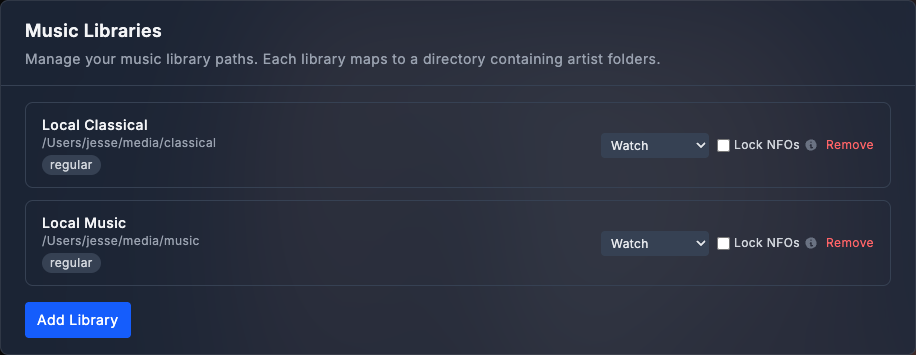
Where to find the library controls:
Settings is one long scrolling page. Down the left side is a section nav; click Music libraries in it (under the Essentials group) to jump straight to the Music Libraries section, or scroll to it. Every library is a row in that section.
Artists
An artist is one entry per musical entity. Stillwater stores the things you'd put in an NFO file plus a layer of book-keeping: provider IDs, image presence flags, lock state, scan timestamps.
The shape, in broad strokes:
- Identity: name, sort name, disambiguation, plus IDs from MusicBrainz, AudioDB, Discogs, Wikidata, Deezer, and Spotify.
- Descriptive metadata: type, gender, origin, genres, styles, moods, years active, born/died, formed/disbanded, biography.
- Filesystem state: the path under the library root, plus presence of each of the four image slots (and whether each is low resolution).
- Library attachment: every artist belongs to exactly one library.
- Lock state: whole-artist lock, per-field locks. See field locks.
- Rule state: when the artist last changed, when rules last evaluated, and the resulting health score.
Every artist belongs to exactly one library. That attachment decides which library's NFO-write policy applies, which connections are allowed to refresh it, and where on disk to put files.
Artist directories
For libraries with a path, each artist lives in its own subdirectory. The directory name is the artist's identity from the scanner's point of view. Inside, Stillwater expects -- and writes -- a flat collection of files:
artist.nfo-- the metadata XMLfolder.jpg/artist.jpg/poster.jpg-- the thumb (any of these names works on read; Stillwater writes one canonical name on save)fanart.jpg-- the primary backdrop. Multi-fanart support adds numbered variants.logo.png-- transparent-background logobanner.jpg-- wide horizontal art
Stillwater is permissive on read (any of the conventional filenames works) and conservative on write (one canonical name per slot).
Discovery and scanning
Artists are added to Stillwater in three ways:
- Filesystem scan -- walks the library root, treats each subdirectory as a candidate artist, and reads any
artist.nfoit finds to populate fields. New directories become new artist records; vanished directories trigger removal. - Filesystem watch -- when watching is enabled, Stillwater triggers a scan as soon as a new subdirectory appears, so you don't have to click "Scan" after dropping a new artist into the library.
- Platform import -- when you connect Emby, Jellyfin, or Lidarr, Stillwater can pull the platform's artist list directly. These artists may be pathless (no directory on disk yet), in which case filesystem-touching rules are skipped until paths exist.
Once an artist is in Stillwater, its lifecycle is independent of the scan -- you can edit its metadata, run rules against it, refresh it from providers, all without re-scanning the library.
How they connect
The simplest way to picture the relationship:
Library  ---owns--->  many Artists
   |                       |
   |                       +--- has metadata (NFO + DB)
   |                       +--- has images (4 types)
   |                       +--- can be locked (whole or per-field)
   |                       +--- can be evaluated by rules
   |
   +--- decides scan + watch behavior
   +--- decides whether NFO writes ask platforms not to overwrite
   +--- carries the platform connection (or "manual")
Once you've internalized that shape, the rest of the docs are details: how NFOs are parsed and written (NFO files), how images flow in (images), how providers populate fields (providers), how rules check those fields (rules), and how locks protect them (field locks).