Field locks
A lock is Stillwater's way of saying "don't touch this." It keeps your manual edits from being overwritten the next time a provider refresh runs or a connected platform pushes its own metadata.
There are two layers of locks, plus a library-wide switch. They are enforced in different places and cover different overwrite paths, so it is worth knowing which one to reach for.
Layer 1: artist lock (the big switch)
The simplest lock: an entire artist is locked or not. When an artist is locked:
- Provider refreshes skip the artist entirely -- the per-artist Refresh button, a bulk refresh sweep, and the Discography tab's Fetch discography.
- Rules skip the artist. A locked artist is not evaluated, and a fix requested against one is declined with "artist is locked."
- Renaming the artist's folder on disk is refused.
- The NFO Stillwater writes for the artist asks Kodi/Emby/Jellyfin not to overwrite it during their own metadata scans (via
<lockdata>true</lockdata>).
The lock records where it came from, shown next to the lock chip: user (you clicked the toggle, or a bulk action locked the artist), initial import (the artist was first discovered with an NFO already carrying the lockdata flag, and only that first discovery sets it, so a rescan does not undo an unlock you made), or platform (the scheduled lock sync pulled a change from a connected Emby or Jellyfin server). All three behave identically once set.
Manual edits remain allowed when locked. The artist lock blocks automated changes, not your own keyboard.
Layer 2: field locks (per-field protection)
Sometimes you want most of an artist's metadata to refresh from providers, but two or three fields you have curated by hand should stay put. That is a per-field lock.
You pin a field (biography, sort name, born year, and so on), and the paths listed below leave that field alone. Pinned date and gender fields also survive the post-merge "this value does not apply to this artist type" cleanup, so a born year you pinned on a band stays.
A field lock is honored by:
- Provider refreshes, including the Name and Sort name written by a language-preference refresh, and the band-member list.
- Bulk fetch metadata, which fills empty fields. A pinned field is left empty rather than filled.
- NFO import during a library scan.
- Matching an artist to a Discogs or TheAudioDB entry by name. If that provider's ID field is pinned, the match is refused and Stillwater tells you to unlock the field first.
A field lock is honored by the rule engine, for artist metadata and for provider IDs alike. Rules used to gate on the whole-artist lock only, so on an artist that was not locked an auto-mode rule could overwrite a field you had pinned. That is now blocked: a pinned biography, origin, name, sort name, genres, styles, moods, type, gender, disambiguation, or any of the date fields is restored if a rule tries to change it, and the rest of that same write still lands. The rules that write those fields are the ones that fill an empty biography, replace a placeholder biography, fill a missing origin, and promote a localized name and sort name.
A rule whose only change was reverted no longer reports a repair. Its entry stays open rather than being marked fixed, it is left out of the "fixed" count the run reports when it finishes, and no entry appears in Recent Activity for it. The run log records which artist and which field instead, so a rule quietly fighting a lock is visible instead of silently succeeding every night. The entry stays open rather than being closed out because unlocking the field is all it takes to make the rule work, and a closed-out entry never comes back. A rule that changed a pinned field and an unpinned one still counts as a repair, since the unpinned half really did land.
All six provider ID fields are covered: MusicBrainz, TheAudioDB, Discogs, Wikidata, Deezer, and Spotify. Pinning one stops the rules that adopt a MusicBrainz ID and backfill missing Discogs, Deezer, and Spotify IDs. The backfill rule skips a pinned ID and says so, instead of reporting a fix it did not make. The entry stays open the same way any other lock-reverted rule's does -- even when every ID still missing on that artist was pinned -- because unlocking a field is all it takes to make the rule work again, and a closed-out entry never comes back. The Fix button does nothing until you unlock the field, whether you clicked it yourself or the rule ran on its own; the message names which fields are locked so it is clear why. You can still change a pinned ID yourself by editing the field directly; the link and identify flows, which choose a whole new identity for the artist, tell you the field is locked instead of overwriting it.
Two other paths are deliberately not covered. A band member list lock is honored by a refresh but not by a rule. And your own explicit edits and undos are never blocked, which is the next section.
Your own edits are not blocked by a field lock either. Pinning a field hides its inline edit controls so you do not change it by accident, but an explicit edit or an undo from the history view still writes it. That is deliberate, since an undo is how you recover a value an automated write already changed.
Field locks are still the mechanism to reach for whenever you have corrected a value a refresh would otherwise replace. A refresh rewrites most fields with whatever the providers return, and re-identifying an artist runs a refresh against the new identity, so an unpinned correction lasts only until the next one of either.
The refresh how-to lists which fields a refresh replaces outright, which it can clear, and which it never touches.
Field locks coexist with the artist-level lock. Unlocking the artist does not clear field locks; they are independent layers.
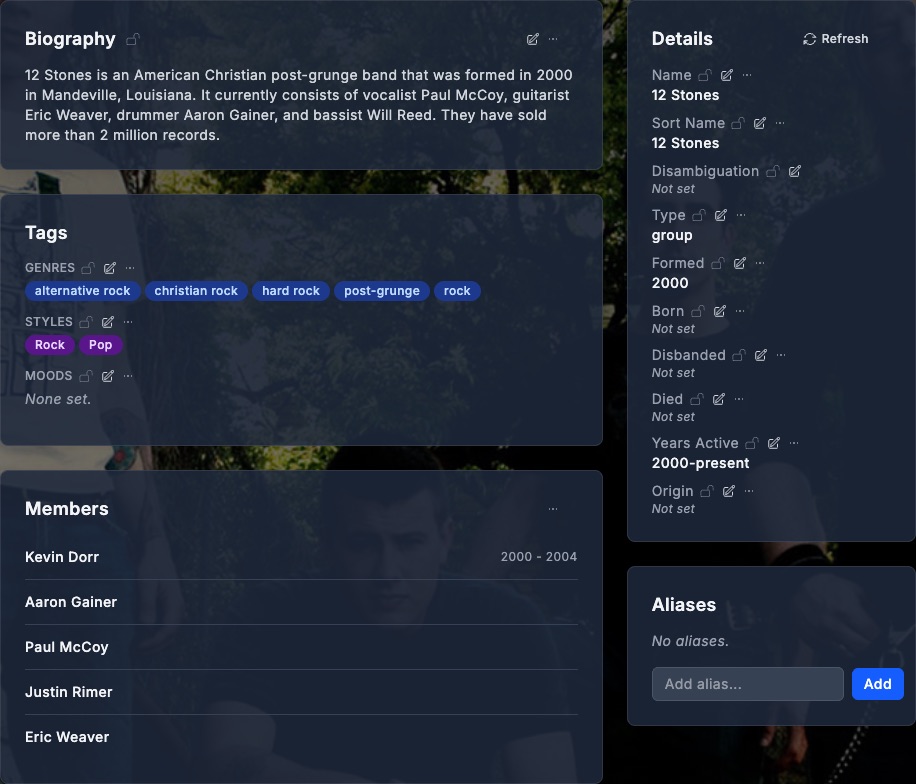
Where to find the lock controls: open an artist from the Artists sidebar item; lock icons sit next to the Biography heading, each tag-group label (Genres / Styles / Moods), and every field in the Details panel. When an artist has anything pinned, a Locked fields card lists each one as a chip you can unlock in a click.
Locking a field is a read-mode action: every field carries a padlock next to its value (gray and open when unlocked), and clicking it toggles the lock. A locked field's padlock turns amber and closed, and the read view shows the value without its inline edit control. A field lock does not disable the editor in edit mode: it stops automated writes from the paths listed above, not your own deliberate edit. Hover the demo below to see the same field switch from unlocked to locked:
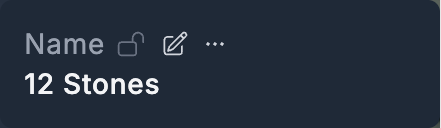
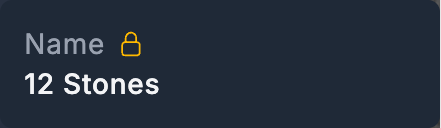 Hover or focus to lock
For context, here is the whole Details section showing where the lock controls live -- next to the Biography header, each Tags group, and every field row:
Automatic repair of pinned fields a rule overwrote
Rules honor field locks at the moment of writing, but enforcement at a single point means a future defect there would let damage reach the database before anything could stop it. As a safety net for that case, Stillwater runs a one-time repair at startup that puts such values back, without any action on your part.
This is a forward-looking net, not a recovery tool for the past. It can only restore a change whose record names the rule that wrote it, and change records only began carrying that attribution recently -- after the same release that taught rules to honor field locks in the first place. A field a rule overwrote on an earlier version is not restored by this repair: its change record does not say a rule wrote it, so it cannot be told apart from an edit you made on purpose, and restoring over it could destroy your own work. On most installations the repair therefore reports nothing to restore, and that is the expected result. The blast radius report is the place to review and hand-recover that older damage.
The repair is deliberately cautious. It restores a field only when all of the following hold:
- The field is pinned right now. Damage on a field you have since unpinned is left alone.
- The most recent change to that field still reads as damage: you had a value, something replaced it, and nothing has recovered it since. If you edited the field yourself after the damage, your edit is the newest change and nothing is restored over it.
- The change record itself says a rule wrote it, and that rule really does write that field. A change that merely looks like damage but cannot be traced to a specific rule is never restored, because it is indistinguishable from an edit you made on purpose.
What it can restore: damage a rule writes to a pinned field from here on, if such a write ever slips past the lock enforcement.
What it cannot restore, and reports instead: damage whose change record does not name a rule. Everything written before rule attribution existed looks like this, as does any change made by a scan, an import, or a provider refresh. MusicBrainz and other provider IDs also have no per-field change history, so there is nothing to restore them from. All of this is counted and logged as unrecoverable rather than silently skipped -- the blast radius report remains the place to review and hand-recover it.
Each restored value appears in the artist's Recent Activity as an ordinary revert, and the pair drops out of the blast radius report because the field now holds your value again. The startup log summarizes the run: how many pairs were restored, how many were unrecoverable, and how many failed. The repair runs once per database. A run that hit a passing problem on some rows -- the database briefly unreadable, a write that could not land -- retries those rows at the next start, and rows repaired earlier are not touched again. A restore that is refused for a reason that would repeat identically every time (for example, putting the old value back would collide with another artist's name) is different: retrying cannot change that answer, so such rows are counted and reported in the log's own category and the repair still finishes rather than re-running forever.
Library-wide: NFO lockdata switch
Each library has an opt-in switch: when on, every NFO that library writes asks platforms not to overwrite it, regardless of per-artist lock state. The library-level switch is the right tool when you want the whole library treated as authoritative -- "Stillwater writes the NFOs; nothing else should rewrite them." The per-artist lock is the right tool when most of the library can be platform-managed but a few records are special.
What about platforms pushing back?
Stillwater's locks govern changes Stillwater itself makes. The NFO lockdata element extends that request to Kodi/Emby/Jellyfin, but only as far as those platforms honor it (Kodi does; Emby and Jellyfin do for most fields).
For the cases where a platform writes anyway, Stillwater has a separate conflict gate that watches for incoming writes from connected platforms and pauses Stillwater's own writes when external activity is detected, preventing a tug-of-war where both sides keep overwriting each other. The "image / NFO writes paused" banner in the UI is the gate in action.
The two mechanisms are complementary:
- Locks say "do not change this automatically." Set ahead of time, expressing your intent.
- The conflict gate says "right now, something else is writing, so pause until it stops." Reactive, transient, and applied regardless of lock state.
What you don't need to think about
- Getting the lockdata flag into the NFO. Locking an artist, or turning on the library-wide switch, does that for you.
- Conflict-gate coordination with locks. The two are independent. A locked artist still benefits from gate pauses; an unlocked artist gets the same protection from the gate.
- Unlocking to make your own correction. Pinning a field hides its inline controls, but an explicit edit or an undo still goes through.
What you do think about: which artists deserve the artist lock, which fields are worth pinning on artists you leave unlocked, whether any rule that writes those fields should be left in manual mode, and whether the per-library lockdata switch is the right shape for your collection. The edit-artist how-to walks through setting locks in the UI.